

In the wild frontier of data analysis, there lurks a menace so sneaky, so insidious, that even seasoned pros fall prey to its tricks. It’s a ghost in the machine, a phantom in the spreadsheet — invisible spaces! These pesky little characters can turn your carefully crafted merge into a jumbled mess, leaving you wondering why Python isn’t playing nice.
Just because columns look similar on paper doesn’t mean they’re ready for rodeo action. Invisible spaces around strings can cause more problems than a cactus patch at a cattle drive. And don’t even get me started on double spacing within words — it’s like trying to lasso a greased pig!
So how do we wrangle these unruly whitespaces? How do we strip those unwanted varmints lurking around our columns or rows? Well, partner, saddle up and let’s ride into the sunset of data cleaning together. We’ll show you tricks to tame the wild west of whitespace, and before you know it, your merges will be smoother than a well-oiled saddle.
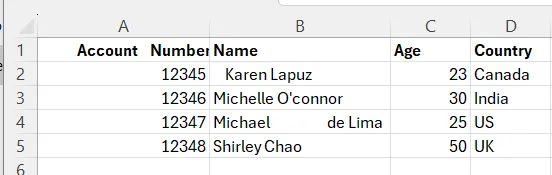
First Data
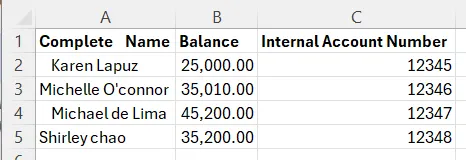
Second Data
Strip whitespaces around columns
import pandas as pd

df_01 = pd.read_csv('df_01.csv')
df_01.columns.str.strip()
df_02 = pd.read_csv('df_02.csv')
df_02.columns.str.strip()Now that we’ve removed those pesky whitespaces from our columns, it’s high time to wrangle those unwanted whitespaces around the rows for our joining keys. We’re fixing to hook up our two dataframes, and we need to make sure our ropes are strong enough to hold ’em tight.
Our left (first) dataframe’s gonna be tied to the post with the Account Number column, while the right (second) dataframe’s gonna be hitched up with the Internal Account Number. Both of these variables are of the object data type, so we’ll need to make sure we’re talkin’ the same language when we’re comparing them.
Left Dataframe
df_01['Account Number'] = df_01.apply(
 lambda x: x.strip()
 if isinstance(x, str)
 else x
 )
Right Dataframe
df_02['Internal Account Number'] = df_01.apply(
 lambda x: x.strip()
 if isinstance(x, str)
 else x
 )
Now that we’ve just stripped the whitespaces from our key columns, we can now perform the merge with our lasso.
df = pd.merge(df_01, df_02, left_on='Account Number', right_on='Internal Account Number', how='inner')After successful merge, we can strip those white spaces around other rows, in which their columns are of string data type. The purpose of removing those white spaces is to check if rows on the column of first dataframe have similar values as that of the column in the second dataframe. We’d like to avoid duplicated column. So we may drop either of these columns if found to be a duplicate. How do we do this with Python?
Steps:
- Strip white spaces around rows whose columns are of object data type
- Reduce two spaces or more within the word to single space
- Compare one column to another to see if they have similar context
Step 1: Strip those White Spaces around Rows, Reduce 2 or more spaces to single space within a name, and capitalize each word

They may look alike, but I bet yah, some of those rows have whitespaces around them, and even two spaces or more between each word. Suppose rows in another column have whitespaces around them or double spacing within the row: When we perform similarity checking between rows in one column against another on Step 2, it will return False due to unwanted whitespaces around the rows. It may also be possible due to difference in letter-case.
Before you scratch your thinning hair, let’s saddle up and solve this problem. Run the script below to strip those whitespaces around rows of columns whose data type is string. Additionally, depending on the context of the column, transform the characters to one of the following: uppercase(), lowercase(), capitalize(), or title(). In this context, we transform the characters to title() since we are comparing Name of a person. whose every word should be capitalized where data type is string:
import re

for col in df.columns:
 if df[col].dtype == 'object':
  df[col] = df[col].apply(
   lambda x: re.sub(r'\s+', ' ',  x.strip().title())
   if isinstance(x, str)
   else x
)
This code checks first whether Name column or Complete Name column is null. If not null, then it checks the boolean value whether Name column is similar to Complete Name column. When it returns False after the strip, then we are certain that there are character differences between two strings. It’s false neither because of a whitespace difference, not letter casing. It is false due to, possibly, a difference in context if majority of the column returns False.
With our sample data, it now returns to all True since we’ve successfully performed stripping of whitespaces, replacing double spaces to single space, and transforming letter-case to title().
Now, we can check if all rows in Equal Columns is True
(df['Equal Columns'] == True).all()If it returns True, then we may simply drop either Name or Complete Name variable and keep the rest of our record.
drop_col = ['Complete Name', 'Internal Account Number']
df.drop(columns=drop_col, axis=1, inplace=True)
Key Takeaways:
- Invisible spaces around strings can cause issues when merging dataframes, even if columns seem similar.
- Stripping whitespace is crucial before performing merges or joins to ensure proper alignment of key values.
- There are multiple ways to strip whitespace in pandas:
– Using str.strip() method
– Using regular expressions with re.sub() - After stripping whitespace, it’s good practice to check for and remove duplicate rows to avoid redundancy. (This will be on my next article)
- Case sensitivity matters when comparing strings. Converting to a consistent case (e.g. title case) can help.
Conclusion
And there you have it, fellas! We’ve demonstrated techniques for stripping whitespace, transforming letter-case and preparing data for merging, providing data scientists with practical tools to overcome common data cleaning challenges. By carefully slashing whitespace, and handling case sensitivity, you can ensure cleaner, more reliable data integration. It’s high noon in the world of data wranglin’!
Remember, always keep your wits about you when dealin’ with data in the Wild West of Python. Happy trails!