

Unnamed column appears when a column exists without a header, whether it contains empty rows.
If the unnamed column has empty rows in them, might as well get rid of this column. Common scenario where unnamed column appears is on the first x axis of an Excel file. In this example, we have the following dataframe information:
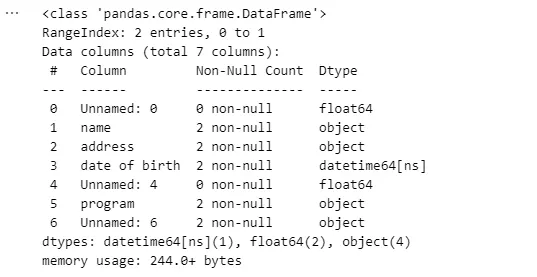
Here is how we can get rid of the first Unnamed column with empty rows:
import pandas as pd

file = 'Book1.xlsx'
cols = pd.read_excel(file).columns.to_list()
df = pd.read_excel(file, usecols=cols[1:]
df.info()
CODE BREAKDOWN
We read the columns (or headers) of the file, and turn it into a list.
cols = pd.read_excel(file).columns.to_list()We read the file and retrieve the first index (we exclude the zero-index) until the end.
df = pd.read_excel(file, usecols=cols[1:]MULTIPLE UNNAMED COLUMNS WITH EMPTY ROWS
But, wait! What if we have multiple unnamed columns. Some having having empty rows and others don’t. We cannot just get rid of all these unnamed columns if they’re not empty rows. To only get rid of unnamed columns with empty rows, first, let’s identify what those empty rows are.
df.isnull().all()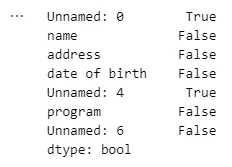
We identify empty rows as ‘Unnamed: 0’, and ‘Unnamed: 4’. To dynamically drop these columns containing ‘Unnamed’ string and empty rows, we write the code below:
unnamed_cols = df.columns[df.columns.str.contains('Unnamed:')].to_list()
empty_cols = lambda col: df[col].isnull().all()
remove_cols = [col for col in unnamed_cols if empty_cols(col)]
df1 = df.drop(columns=remove_cols, axis=1)
df1.info()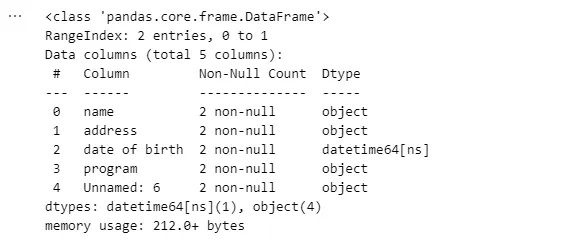
That’s how swift and neat it is, folks! We got rid of all columns with empty rows if their column name contains the string ‘Unnamed.’
To get rid of the unwanted ‘Unnamed’ that usually appears at zero-index, it is best practice to save the csv with index set to False.
df1.to_csv('df1.csv', index=False) # for CSV
df1.to_excel('df1.xlsx', index=False) # for Excel
CONCLUSION
When we prepare our dataset and perform data cleaning, it is imperative to drop all columns with empty rows. Often, they contain ‘Unnamed’ string in their column. We used usecols for selecting the columns. Unfortunately, it is not efficient to use usecols to drop other columns with empty rows. So we dynamically select all columns with empty rows containing the string ‘Unnamed’ without specifying the exact name of the column. Isn’t this neat and efficient!?